Blockchain Gravityresearch
/ 31 — Try for free Pricing
Free Windows 10 and 11, 64-bit

Download Blockchain Gravity Terminal

The free version has every tool in the Terminal, with all data delayed 24 hours. It needs no account.

The free version is delayed 24 hours. Every chart shows the market as it was a day ago. Trading and price alerts are off, because orders are never placed on prices from a day ago. Upgrading switches the app to real-time data without a reinstall. Get real-time data

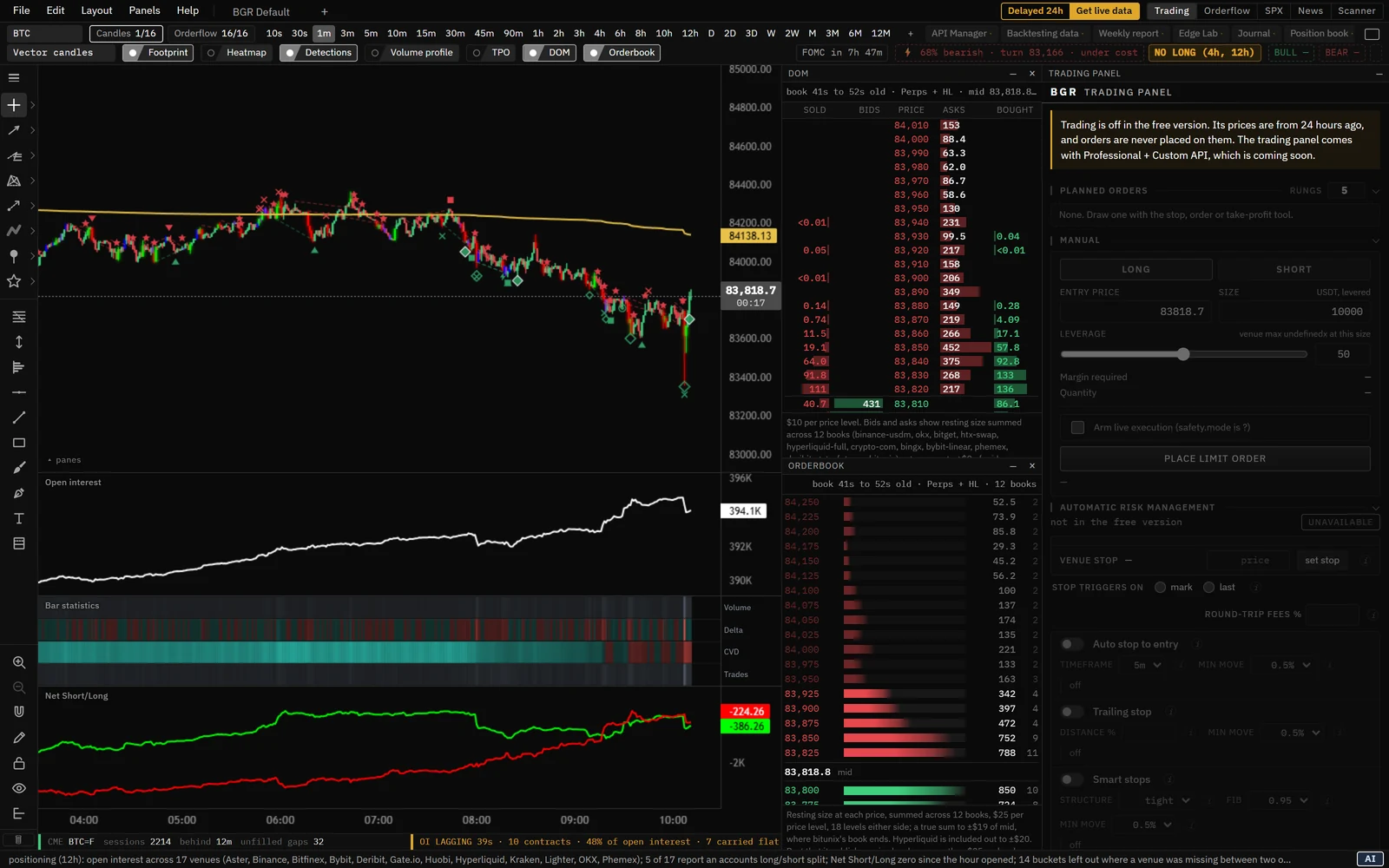
The free Blockchain Gravity Terminal as it opens: one-minute candles with the footprint and detections, open interest, bar statistics and Net Short/Long, the DOM and orderbook docked beside the chart, the trading panel, and the Delayed 24h badge

Free or Professional

Both are the same app with the same tools. The difference is when the data reaches you.

Free
$0no account needed
Data delayed 24 hours
  • Every chart and tool in the Terminal, from the footprint and the order book heatmap to the liquidation map, volume profiles and TPO
  • Every venue and their aggregate, on every timeframe from 10 seconds to 12 months
  • The Orderflow, SPX and News workspaces
  • Ten token scans in any 24 hours once you sign in
  • No account needed
  • All data delayed 24 hours
  • No trading and no price alerts
Market data
  • 15+ venues and their aggregateBinance, Bybit, OKX, Bitget, Gate.io, HTX, Phemex, Deribit, Kraken, Hyperliquid, MEXC, BingX, Bitunix, Blofin, Crypto.com and Bitfinex, one at a time or summed. Delayed 24h
  • Footprint history back to 2019From Binance's published trade archive. Delayed 24h
  • Order books recorded about once a secondEach venue's own depth feed, archived hour by hour. Delayed 24h
  • Open interest every ten secondsA cross-exchange feed, with the newest minutes from each venue's own readings. Delayed 24h
  • Hyperliquid positions every five minutesRead from Hyperliquid's public account data. Delayed 24h
  • Missing data is shown as missingA gap or a stale feed is labeled, never drawn as a zero.
Charting
  • 27 built-in timeframes10s, 30s, 1m, 3m, 5m, 10m, 15m, 30m, 45m, 90m, 1h, 2h, 3h, 4h, 6h, 8h, 10h, 12h, D, 2D, 3D, W, 2W, M, 3M, 6M and 12M. Delayed 24h
  • Custom timeframesAdd your own, such as 20s, 7m, 2h, 5D or 2W. Delayed 24h
  • 10 and 30 second barsBuilt straight from recorded trades. Delayed 24h
  • Five chart stylesVector candles (PVSRA), classic candles, Heikin Ashi, OHLC bars and line.
  • Split viewUp to four charts in one window, each with its own layout.
  • Layouts and tabsSave the whole chart setup by name and switch between layouts in tabs.
  • Docking panelsDock, stack, collapse and resize panels around the chart.
  • Multi-monitor windowsDrag a tab into its own window, and open a saved layout on each monitor at start-up.
  • Indicator rowsReorder, resize and hide every row at once.
  • Price and candle countdownThe last price and the time left on the bar.
  • Keyboard shortcuts you can change
  • Themes and colorsFour backgrounds, your own up, down and accent colors, and text size.
Drawing tools
  • Fibonacci, trend line, horizontal line and rectangle
  • MeasureThe move in dollars and percent.
  • Brush, pen and text notes
  • Risk / reward boxA drawing only. It never sends an order.
  • TradingView-style trend line toolsRays, channels, regression trend, anchored VWAP and more.
  • Gann and Fibonacci toolsPitchforks, fib extensions, channels, fans, arcs, circles and Gann boxes.
  • Chart patterns and Elliott wavesXABCD, cypher, head and shoulders, three drives and five Elliott wave tools.
  • Prediction and measurement toolsPosition forecast, date and price ranges, bars pattern and ghost feed.
  • Shapes, annotations, icons and emojis
  • Undo history and drawing lockUp to a hundred steps back, and a lock that lets clicks pass through.
Orderflow
  • Footprint chartBid and ask volume at every price in every candle, in four views. Delayed 24h
  • Footprint imbalancesDiagonal imbalances and stacked imbalance zones. Delayed 24h
  • Footprint point of control and value areaFor every bar, with naked POCs carried forward. Delayed 24h
  • Footprint row sizes from $0.10 to $100Trades are recorded at every tick. Delayed 24h
  • Choose the venues summedSum any set of venues in the footprint. Delayed 24h
  • Delta Delayed 24h
  • CVDCumulative volume delta, reset by session or anchored. Delayed 24h
  • Open interestAs a line or as the change on each bar. Delayed 24h
  • Net Short/LongOpen interest split by which side opened it. Delayed 24h
  • Spot vs PerpSpot and perpetual flow side by side. Delayed 24h
  • Liquidation histogramThe liquidations that happened in each candle, longs and shorts. Delayed 24h
  • Bar statisticsVolume, delta, CVD, trades and more under every candle. Delayed 24h
  • Funding Delayed 24h
  • Basis Delayed 24h
  • VolumeWith buys and sells split by measured delta. Delayed 24h
Heatmaps
  • Order book liquidity heatmapResting orders at every price over time, from recorded books. Delayed 24h
  • Perpetual, spot and Hyperliquid booksTurn each venue on or off, with a floor for each layer. Delayed 24h
  • Hyperliquid liquidation, take-profit and stop mapsMeasured from Hyperliquid's account data. Delayed 24h
  • Liquidation heatmapWhere leveraged positions would be forced out, projected from measured open interest. Delayed 24h
Volume and profiles
  • Period volume profiles1D, 2D, 3D, 1W, 2W, 1M, 3M, 6M and 1Y, several at once. Delayed 24h
  • Visible range profile Delayed 24h
  • Fixed range profileDrag across any span of time. Delayed 24h
  • Developing POC and value area Delayed 24h
  • Peaks and valleys (HVN and LVN) Delayed 24h
  • Naked POCsCarried forward until price trades back through them. Delayed 24h
  • TPO market profileSingle prints, initial balance, and poor highs and lows. Delayed 24h
  • VWAPUp to three bands, plus weekly, monthly, quarterly and yearly anchors. Delayed 24h
Moving averages
  • EMAAs many lines as you want, each with its own length and timeframe. Delayed 24h
  • SMAAs many lines as you want, each with its own length and timeframe. Delayed 24h
  • WMA Delayed 24h
  • HMA Delayed 24h
  • VWMA Delayed 24h
  • TWAP Delayed 24h
Statistics
  • RSI Delayed 24h
  • Average True Range Delayed 24h
  • Historical volatility Delayed 24h
  • Standard deviation Delayed 24h
  • Z-Score Delayed 24h
Zones
  • Order blocksWith breaker blocks. Delayed 24h
  • Fair value gapsWith inverse gaps and the 50% line. Delayed 24h
  • CME gapsUnfilled weekend gaps and the CME levels. Delayed 24h
Market context
  • Market sessionsTokyo, London and New York opens, ranges and custom sessions. Delayed 24h
  • DVOL bandsThe day's and the week's implied move from Deribit's DVOL, with max pain. Delayed 24h
  • Dealer gammaThe gamma flip and the call and put walls from Deribit's option chain. Delayed 24h
  • Economic calendarUS releases on the chart, with a countdown to the next big one. Delayed 24h
  • CME readoutWhether CME is open, how far behind it is, and how many gaps are unfilled. Delayed 24h
  • Market Control chipsThe five-minute lightning read and any blocked side, in the header. Delayed 24h
Detections
  • Swing failures, poor highs and lows, previous day high and low Delayed 24h
  • RSI and CVD divergencesRegular and hidden, plus exaggerated RSI divergences. Delayed 24h
  • Open interest readsOI divergence, squeeze into a level, top-longing, bottom-shorting and delta spikes. Delayed 24h
  • Footprint readsTrapped traders, stacked imbalances and imbalance support. Delayed 24h
  • Liquidation flush Delayed 24h
Workspaces
  • Orderflow: Market ControlWho is moving price, spot or perpetuals, venue by venue, and who is offside. Delayed 24h
  • SPXThe S&P 500 and the E-mini with dealer gamma, Bitcoin options and CFTC positioning. Delayed 24h
  • NewsThe BGR sentiment rating, the headline score, crowding and upcoming catalysts. Delayed 24h
  • Sentiment vs BTCThe rating's history drawn against the Bitcoin price. Delayed 24h
  • Token scannerA rated report on any Solana, Ethereum, Base or Robinhood Chain contract, with its lifetime footprint. 10 scans in any 24 hours, signed in
Account and support
  • No account needed
  • Sign in with a one-time codeYou never type a password into the app.
  • Your layouts, drawings and settings stay on your computer
  • Email and Discord support

Not included: real-time data, trading and price alerts. Professional is real time, and the trading panel comes with Professional + Custom API.

Professional
$50 a month
Real time
  • Real-time data on every chart and tool
  • Every tool on every venue, and the 15+ venue aggregate
  • Footprint history back to 2019
  • Unlimited token scans (fair use applies)
  • The same app as the free version: upgrading switches it to real time without a reinstall
  • The trading panel comes with Professional + Custom API, which is coming soon
Market data
  • Real-time dataEvery chart, tool and workspace updates live.
  • 15+ venues and their aggregateBinance, Bybit, OKX, Bitget, Gate.io, HTX, Phemex, Deribit, Kraken, Hyperliquid, MEXC, BingX, Bitunix, Blofin, Crypto.com and Bitfinex, one at a time or summed.
  • Footprint history back to 2019From Binance's published trade archive.
  • Order books recorded about once a secondEach venue's own depth feed, archived hour by hour.
  • Open interest every ten secondsA cross-exchange feed, with the newest minutes from each venue's own readings.
  • Hyperliquid positions every five minutesRead from Hyperliquid's public account data.
  • Missing data is shown as missingA gap or a stale feed is labeled, never drawn as a zero.
Charting
  • 27 built-in timeframes10s, 30s, 1m, 3m, 5m, 10m, 15m, 30m, 45m, 90m, 1h, 2h, 3h, 4h, 6h, 8h, 10h, 12h, D, 2D, 3D, W, 2W, M, 3M, 6M and 12M.
  • Custom timeframesAdd your own, such as 20s, 7m, 2h, 5D or 2W.
  • 10 and 30 second barsBuilt straight from recorded trades.
  • Five chart stylesVector candles (PVSRA), classic candles, Heikin Ashi, OHLC bars and line.
  • Split viewUp to four charts in one window, each with its own layout.
  • Layouts and tabsSave the whole chart setup by name and switch between layouts in tabs.
  • Docking panelsDock, stack, collapse and resize panels around the chart.
  • Multi-monitor windowsDrag a tab into its own window, and open a saved layout on each monitor at start-up.
  • Indicator rowsReorder, resize and hide every row at once.
  • Price and candle countdownThe last price and the time left on the bar.
  • Keyboard shortcuts you can change
  • Themes and colorsFour backgrounds, your own up, down and accent colors, and text size.
Drawing tools
  • Fibonacci, trend line, horizontal line and rectangle
  • MeasureThe move in dollars and percent.
  • Brush, pen and text notes
  • Risk / reward boxA drawing only. It never sends an order.
  • TradingView-style trend line toolsRays, channels, regression trend, anchored VWAP and more.
  • Gann and Fibonacci toolsPitchforks, fib extensions, channels, fans, arcs, circles and Gann boxes.
  • Chart patterns and Elliott wavesXABCD, cypher, head and shoulders, three drives and five Elliott wave tools.
  • Prediction and measurement toolsPosition forecast, date and price ranges, bars pattern and ghost feed.
  • Shapes, annotations, icons and emojis
  • Undo history and drawing lockUp to a hundred steps back, and a lock that lets clicks pass through.
Orderflow
  • Footprint chartBid and ask volume at every price in every candle, in four views.
  • Footprint imbalancesDiagonal imbalances and stacked imbalance zones.
  • Footprint point of control and value areaFor every bar, with naked POCs carried forward.
  • Footprint row sizes from $0.10 to $100Trades are recorded at every tick.
  • Choose the venues summedSum any set of venues in the footprint.
  • Delta
  • CVDCumulative volume delta, reset by session or anchored.
  • Open interestAs a line or as the change on each bar.
  • Net Short/LongOpen interest split by which side opened it.
  • Spot vs PerpSpot and perpetual flow side by side.
  • Liquidation histogramThe liquidations that happened in each candle, longs and shorts.
  • Bar statisticsVolume, delta, CVD, trades and more under every candle.
  • Funding
  • Basis
  • VolumeWith buys and sells split by measured delta.
Heatmaps
  • Order book liquidity heatmapResting orders at every price over time, from recorded books.
  • Perpetual, spot and Hyperliquid booksTurn each venue on or off, with a floor for each layer.
  • Hyperliquid liquidation, take-profit and stop mapsMeasured from Hyperliquid's account data.
  • Liquidation heatmapWhere leveraged positions would be forced out, projected from measured open interest.
Volume and profiles
  • Period volume profiles1D, 2D, 3D, 1W, 2W, 1M, 3M, 6M and 1Y, several at once.
  • Visible range profile
  • Fixed range profileDrag across any span of time.
  • Developing POC and value area
  • Peaks and valleys (HVN and LVN)
  • Naked POCsCarried forward until price trades back through them.
  • TPO market profileSingle prints, initial balance, and poor highs and lows.
  • VWAPUp to three bands, plus weekly, monthly, quarterly and yearly anchors.
Moving averages
  • EMAAs many lines as you want, each with its own length and timeframe.
  • SMAAs many lines as you want, each with its own length and timeframe.
  • WMA
  • HMA
  • VWMA
  • TWAP
Statistics
  • RSI
  • Average True Range
  • Historical volatility
  • Standard deviation
  • Z-Score
Zones
  • Order blocksWith breaker blocks.
  • Fair value gapsWith inverse gaps and the 50% line.
  • CME gapsUnfilled weekend gaps and the CME levels.
Market context
  • Market sessionsTokyo, London and New York opens, ranges and custom sessions.
  • DVOL bandsThe day's and the week's implied move from Deribit's DVOL, with max pain.
  • Dealer gammaThe gamma flip and the call and put walls from Deribit's option chain.
  • Economic calendarUS releases on the chart, with a countdown to the next big one.
  • CME readoutWhether CME is open, how far behind it is, and how many gaps are unfilled.
  • Market Control chipsThe five-minute lightning read and any blocked side, in the header.
Detections
  • Swing failures, poor highs and lows, previous day high and low
  • RSI and CVD divergencesRegular and hidden, plus exaggerated RSI divergences.
  • Open interest readsOI divergence, squeeze into a level, top-longing, bottom-shorting and delta spikes.
  • Footprint readsTrapped traders, stacked imbalances and imbalance support.
  • Liquidation flush
Workspaces
  • Orderflow: Market ControlWho is moving price, spot or perpetuals, venue by venue, and who is offside.
  • SPXThe S&P 500 and the E-mini with dealer gamma, Bitcoin options and CFTC positioning.
  • NewsThe BGR sentiment rating, the headline score, crowding and upcoming catalysts.
  • Sentiment vs BTCThe rating's history drawn against the Bitcoin price.
  • Token scannerA rated report on any Solana, Ethereum, Base or Robinhood Chain contract, with its lifetime footprint. Unlimited, fair use
Account and support
  • Sign in with a one-time codeYou never type a password into the app.
  • Your layouts, drawings and settings stay on your computer
  • Email and Discord support

Not included: the trading panel, its order, stop and take-profit boxes, automatic risk management, the research tools and the automated journal. They come with Professional + Custom API, which is coming soon.

Install in 3 steps

  1. 1

    Download

    Download the installer for Windows. It is 18.2 MB and installs to your user profile, so you don't need administrator rights.

  2. 2

    Run it

    The beta isn't code-signed yet, so Windows SmartScreen says the publisher is unknown. Click More info, then Run anyway. Apart from the missing signature, the beta is the full software the founder trades with.

  3. 3

    Start free, or sign in

    The Terminal opens on the free version, with no account. To use a paid plan, open File › Account… and press Sign in. The app shows a code, and you approve it on this site. You never type a password into the app.

System requirements

System
Windows 10 or 11, 64-bit
Download
18.2 MB installer, or a 14.0 MB portable zip
Rights
No administrator rights. It installs to your user profile.
Connection
Internet. The free version's data comes from our servers.
Your files
Drawings, layouts and sign-in are stored in %LOCALAPPDATA%\BlockchainGravityTerminal and are kept when you update.
Removing it
Use Settings > Apps, or run Uninstall.cmd in the app folder.

Verify your download

Each release lists its checksum on this page. Compare it with the SHA-256 of the file you downloaded. That is the same check a code signature does, but done by hand.

SHA-256 of BlockchainGravityTerminal-0.1.0-beta.11-Setup.exe
4d0115b60da89a6eb066afa2177fdb530ce8614c55010935820c115aea5b54b9
In PowerShell, in the folder you downloaded to
Get-FileHash .\BlockchainGravityTerminal-0.1.0-beta.11-Setup.exe

The Hash column it prints should match the checksum above. PowerShell prints it in capital letters, and that doesn't matter.

Questions

Is it free?

Yes. The free version costs nothing and needs no account. It has every tool in the Terminal, with all data delayed 24 hours.

Why is the data delayed?

The free version is the whole Terminal running a day behind, and real-time data is what Professional adds. Every chart shows the market as it was 24 hours ago, with the real times of that day, and it moves forward minute by minute. Trading and price alerts are off, because orders are never placed on prices from a day ago.

How do I get real-time data?

Choose Professional on the pricing page, then sign in to the app. It switches to real-time data without a reinstall. If it still shows the free version, press Check my plan in File › Account….

Are my data and exchange keys safe?

The free version never sends your data anywhere and has no telemetry. It doesn't connect to any exchange, because its data comes from our servers a day late. You only have an account if you create one. The app only holds exchange keys if you add them to the trading panel on Professional + Custom API, and those keys never leave your computer. Orders go straight from your computer to the exchange.

Is there a Mac or Linux version?

Not yet. The desktop Terminal runs on 64-bit Windows 10 or 11 for now. On any other computer you can use the web terminal in your browser, free and with no account.

How do updates work?

The app doesn't update itself yet. We post each new version on this page with its checksum and list it in the changelog. To update, download the new installer and run it. Your drawings, layouts and sign-in are kept.

More answers are on the support page and in the install guide.